Personas
Learn how to create and use test personas to simulate different user behaviors, interaction patterns, and testing scenarios in Rock Smith.
What Are Test Personas
Test Personas define how the AI agent behaves when executing test flows. Instead of testing with a single "default" behavior, personas let you simulate:
- Different user skill levels (novice vs. expert)
- Various interaction patterns (careful vs. impulsive)
- Specific testing goals (complete a purchase, explore features)
- User constraints (accessibility needs, time pressure)
This helps you discover issues that only appear for certain types of users.
Why Use Personas
Find User-Specific Issues
Different users interact with applications differently:
- Novice users may click slowly and read instructions
- Expert users may use keyboard shortcuts and skip help text
- Impatient users may click rapidly and abandon slow processes
Personas help you test these different interaction patterns.
Realistic Test Coverage
Personas make tests more realistic by simulating:
- Natural pauses and hesitations
- Reading time for content
- Decision-making behavior
- Error recovery patterns
Edge Case Discovery
Some bugs only appear under specific conditions:
- Racing through forms too quickly
- Spending too long on a page (session timeout)
- Unusual navigation patterns
Creating Personas
Rock Smith offers two ways to create personas: manual creation and AI generation.
Manual Creation
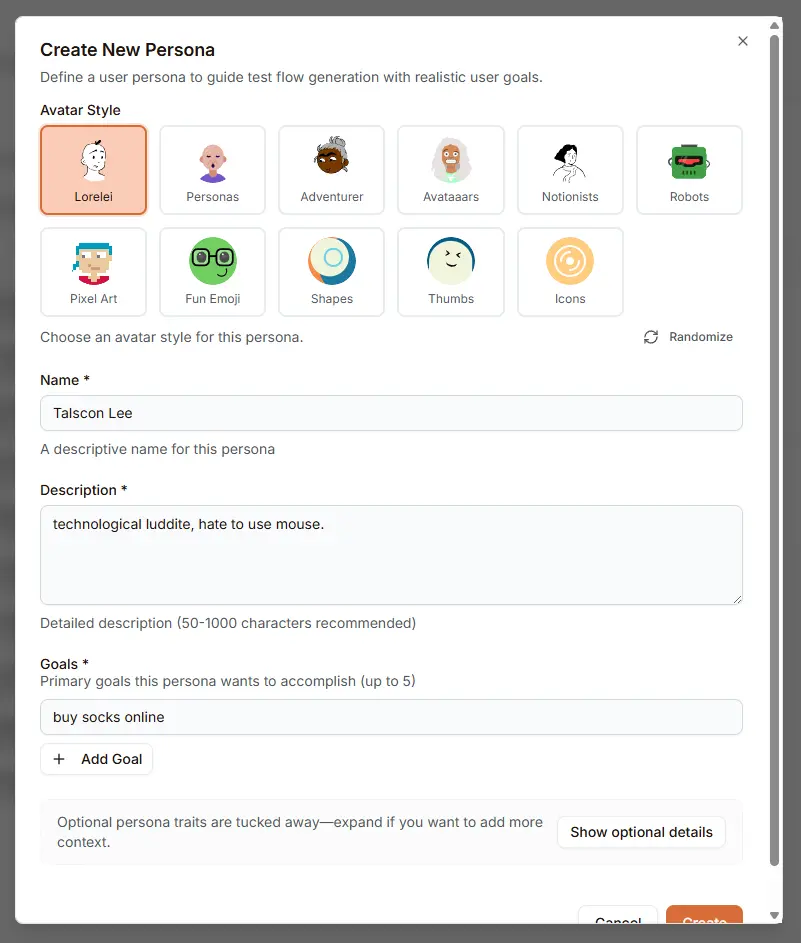
Create a custom persona with full control over its characteristics:
- Navigate to Personas in the sidebar
- Click Create Persona
- Choose an Avatar Style for visual identification
- Fill in the required fields:
- Name: A descriptive name (e.g., "Impatient Mobile User")
- Description: Detailed characteristics (50-1000 characters recommended)
- Add Goals the persona wants to accomplish (up to 5)
- Optionally expand Show optional details for additional configuration
- Click Create
Avatar Styles
Choose from 11 avatar styles to visually distinguish your personas:
| Style | Category |
|---|---|
| Lorelei | Character |
| Personas | Character |
| Adventurer | Character |
| Avataaars | Character |
| Notionists | Character |
| Robots | Retro |
| Pixel Art | Retro |
| Fun Emoji | Fun |
| Shapes | Geometric |
| Thumbs | Simple |
| Icons | Simple |
Use the Randomize button to generate a unique avatar seed.
Defining Goals
Goals describe what the persona is trying to accomplish. Write them as specific, actionable objectives:
- "Buy socks online"
- "Navigate the homepage and key product sections from a mobile device"
- "Sign up for an account using on-screen keyboard and password manager"
- "Complete an end-to-end flow using mobile UI controls"
Each persona can have up to 5 goals that guide the AI agent's behavior during test execution.
AI-Generated Personas
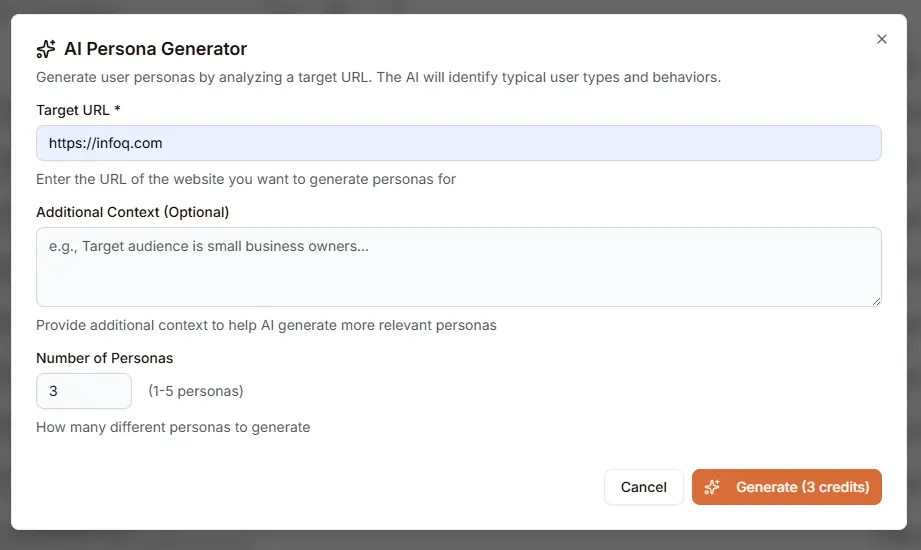
Let Rock Smith analyze your website and generate relevant personas automatically:
- Click Generate with AI in the Personas page header
- Enter the Target URL of the website to analyze
- Optionally provide Additional Context (e.g., "Target audience is small business owners")
- Set the Number of Personas to generate (1-5)
- Click Generate
The AI analyzes your site to identify typical user types and behaviors, then creates personas with realistic goals, constraints, and characteristics.
Credit Cost: 1 credit per persona generated.
Persona Details
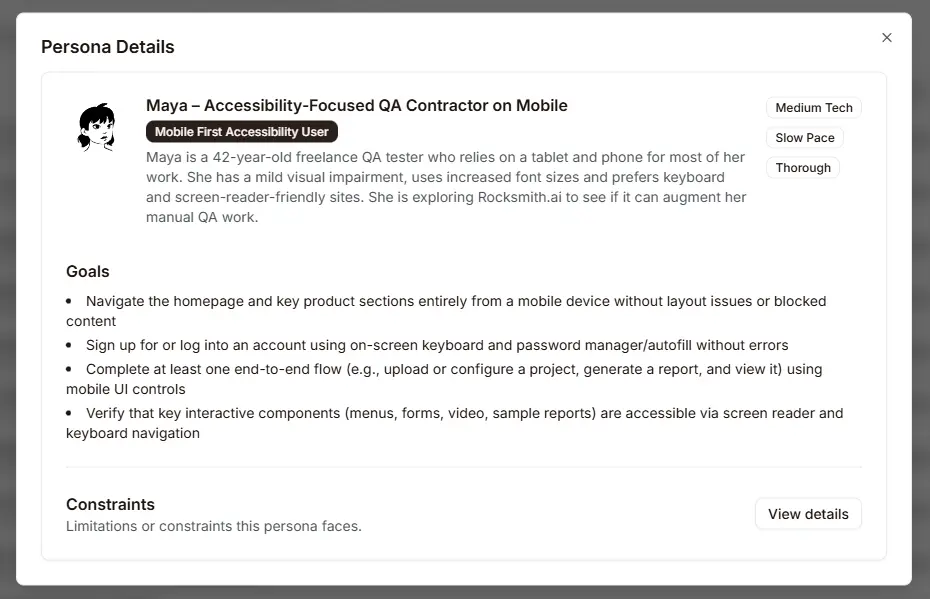
Click on any persona to view its complete details:
Header Information:
- Persona name and avatar
- Archetype badge (e.g., "Mobile First Accessibility User")
- Technical profile badges showing:
- Tech proficiency level (Low/Medium/High Tech)
- Interaction pace (Slow/Medium/Fast Pace)
- Thoroughness (Quick/Thorough)
Goals Section:
- Bulleted list of objectives the persona wants to accomplish
- Written as specific, measurable outcomes
Constraints Section:
- Limitations or restrictions the persona faces
- Click View details to expand and see full constraint information
Persona Library
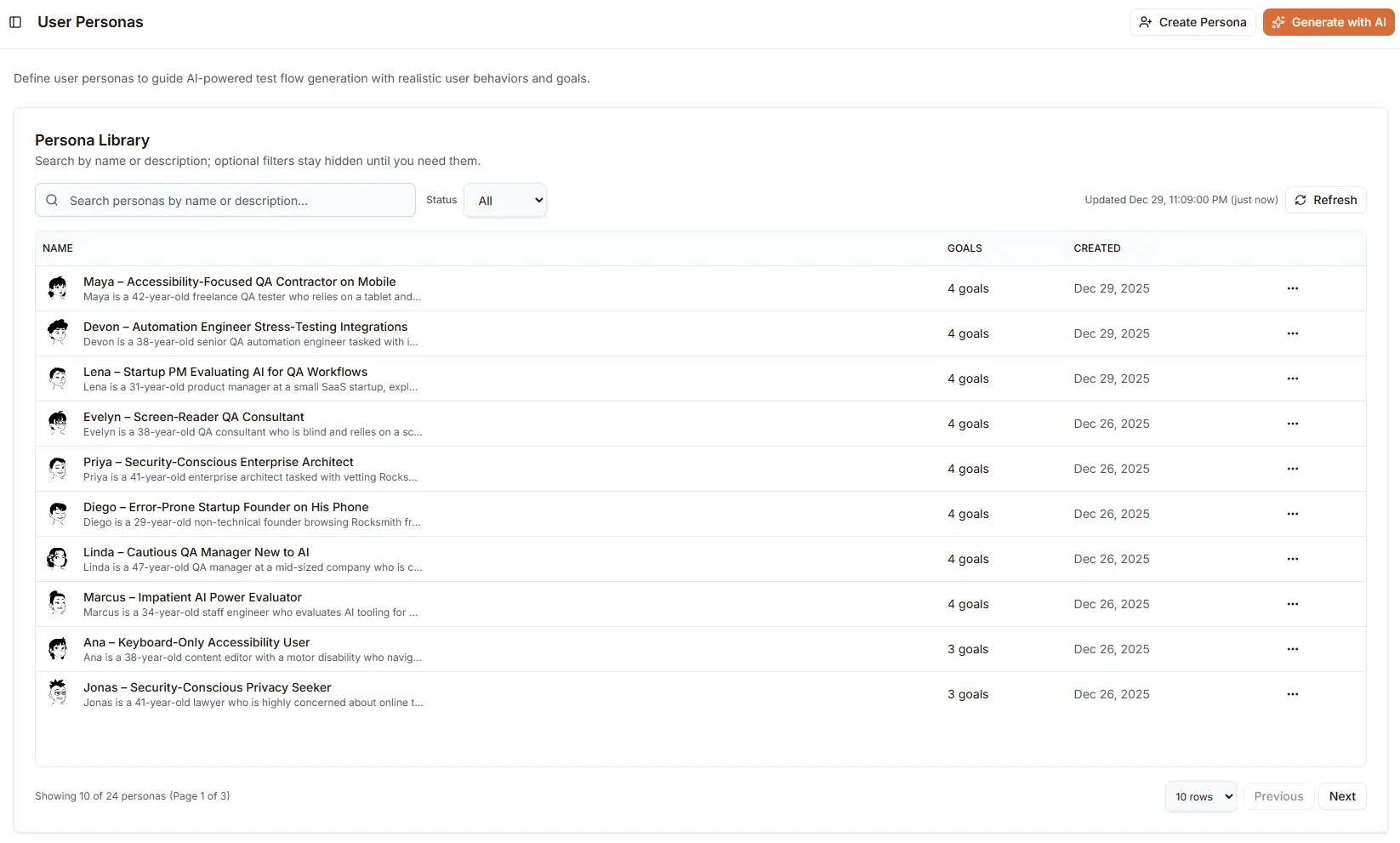
The Persona Library provides a centralized view of all your personas with powerful search and filtering capabilities.
Library Features
- Search: Find personas by name or description
- Status Filter: Filter by active/inactive status using the dropdown
- Refresh: Update the list with the latest data (shows last update timestamp)
- Pagination: Navigate through large persona collections (10, 25, or 50 per page)
Table Columns
| Column | Description |
|---|---|
| Name | Persona name with avatar, archetype, and description preview |
| Goals | Number of goals defined for this persona |
| Created | Date the persona was created |
| Actions | Menu for view, edit, and delete operations |
Using Personas in Testing
Assign to Flow Execution
Run a flow with a specific persona:
- Open a flow
- Click Run
- In execution options, select a persona from the dropdown
- Click Run Test
- The AI agent will behave according to the persona's characteristics
Assign to Discovery Session
Explore your site as a specific persona:
- Start a new discovery session
- Select a persona in configuration
- The AI will explore as that user type would
Best Practices
Persona Design
- Base on real users: Use analytics or user research to inform persona characteristics
- Keep personas distinct: Each should test meaningfully different behaviors
- Update regularly: Evolve personas as your user base changes
- Write clear descriptions: Detailed descriptions help the AI understand the persona
Testing Strategy
- Test critical flows with multiple personas: Especially checkout, signup, and core features
- Use edge case personas sparingly: Not every flow needs every persona
- Prioritize based on user base: Focus on your most common user types
- Combine with edge case testing: Persona + fuzzing = comprehensive coverage
Organization
- Name personas clearly: "Impatient Mobile User" not "Persona 1"
- Use descriptive goals: Specific objectives yield better test behavior
- Archive unused personas: Keep your persona list manageable
Troubleshooting
Persona Not Affecting Behavior
- Check assignment: Ensure persona is selected in execution options
- Review persona goals: Clear, specific goals produce better results
- Verify persona is active: Archived personas cannot be assigned
Unexpected Failures with Persona
- Timing issues: Fast-paced personas may outrun slow page loads
- Element not ready: Add wait steps for dynamic content
- Path differences: Persona may take an unexpected route based on goals
AI Generation Issues
- URL not accessible: Ensure the target URL is publicly accessible
- Insufficient context: Add more details in the Additional Context field
- Generic results: Try a more specific URL (e.g., a product page instead of homepage)
Next Steps
- Working with Flows - Create flows to test with personas
- Edge Case Testing - Combine with fuzzing for thorough testing
- Discovery Sessions - Explore as different user types
- Managing Credits - Understand persona testing costs